Margifi Insights / Insights

Less dashboard hopping. More “now I know.”

Bring your store, ads and courier outcomes together. See what was delivered, what came back and what is left after costs—then decide where to look next.

7-day free trial · ₹2,999/month after trial, GST included.
AutoPay authorization required during setup.

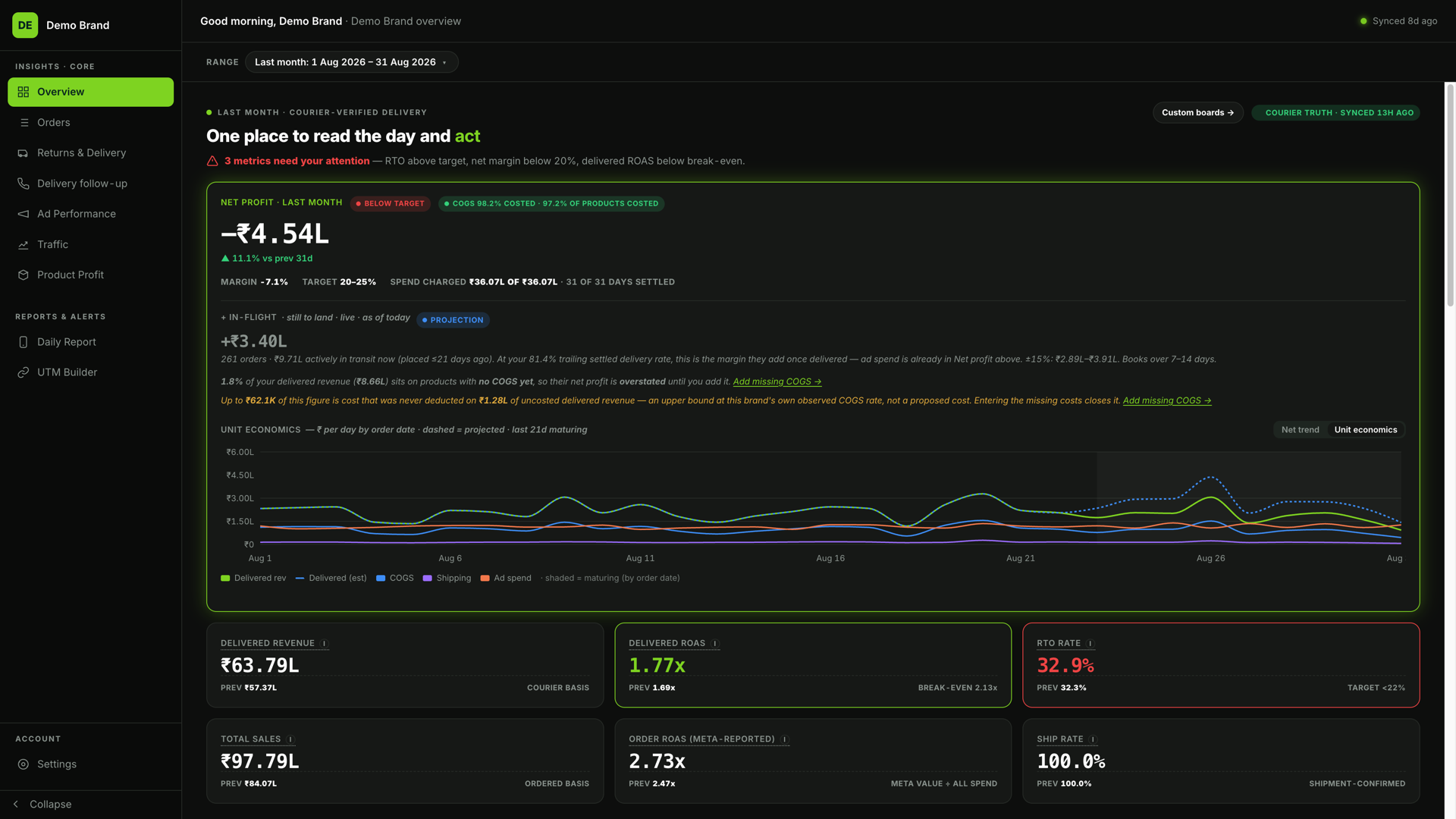
Margifi / OverviewDemo Brand
Margifi Overview — actual product with synthetic Demo Brand data
Open full desktop view ↗Real product · Synthetic Demo Brand data
  • Shopify + ads + courier data
  • Delivery-adjusted profit
  • One connected brand workspace

Meet Insights

The day’s numbers. The bigger picture.

Start with Overview, then follow the question into delivery, advertising or product economics. The walkthrough uses the actual desktop product with synthetic Demo Brand data.

Margifi / OverviewDemo Brand
Play the walkthroughReal product · Synthetic Demo Brand data

01 / Delivery and advertising

Follow the order. Not just the conversion.

Review Returns & Delivery beside the spend that brought those orders in. Separate delivered, returned and pending outcomes before deciding which performance number to trust.

  • Returns & Delivery for the doorstep outcome
  • Ad Performance for spend and delivered ROAS
  • Delivery follow-up for your team’s next call
Explore Ad Performance
Margifi / Returns & DeliveryDemo Brand
Play the walkthroughReal product · Synthetic Demo Brand data

02 / Product economics

Revenue is a headline. Margin is the question.

See product-level contribution with your own costs, shipping, returns and allocated ad spend. Find the missing costs and the products whose sales tell only half the story.

  • Your COGS, with cost coverage visible
  • Product profit and contribution ladder
  • Scale, keep and stop flags to investigate
Explore Product Profit
Margifi / Product ProfitDemo Brand
Play the walkthroughReal product · Synthetic Demo Brand data

03 / A useful daily rhythm

Stay in the loop. Without living in the app.

Use Traffic to understand visits and buyers. Set up Daily Report for the people who need the numbers, on the channels and schedule that fit their day.

  • Traffic and attribution coverage
  • WhatsApp and email reports
  • Your recipients and report schedule
Explore Daily Report
YOUR REPORTING RHYTHM

Your time.
Your numbers.

  1. 01
    Choose the report

    Daily Brief · Marketing · Delivery · Finance

  2. 02
    Choose who receives it

    WhatsApp, email, or both

  3. 03
    Set your send time

    Enable the report when you’re ready

Workflow illustration · not a product screenshot

From connected data to a useful next step

Three steps to clearer decisions.

  1. 01

    Connect the sources

    Bring your Shopify store, ad account and supported courier into your brand workspace.

  2. 02

    Set the foundations

    Add your costs, review connection coverage and complete your trial setup.

  3. 03

    Build your daily view

    Start in Overview, investigate in the relevant page and set up the reports your team needs.

A few things worth knowing

Straight answers.

Before you connect your brand.

Overview, order and delivery analysis, Delivery follow-up, Ad Performance, Traffic, Product Profit and Daily Report are part of the workspace. Available metrics depend on connected sources and data coverage.

Made for Indian Shopify brands

Bring the whole picture to your brand.

Share your details, then create your account. We can help you connect your store, ads and courier.

Get started with your brand

7-day free trial. ₹2,999/month after trial, GST included.
AutoPay authorization required during setup.