Margifi Insights / Daily Report

Stay close to your numbers. Not glued to a dashboard.

Bring your brand’s reporting into your daily rhythm. Choose the reports you need, the people who receive them and the time they arrive on WhatsApp or email.

7-day free trial · ₹2,999/month after trial, GST included.
AutoPay authorization required during setup.

YOUR REPORTING RHYTHM

Your time.
Your numbers.

  1. 01
    Choose the report

    Daily Brief · Marketing · Delivery · Finance

  2. 02
    Choose who receives it

    WhatsApp, email, or both

  3. 03
    Set your send time

    Enable the report when you’re ready

Workflow illustration · not a product screenshot
  • WhatsApp and email
  • Your report, recipients and time
  • Available with connected data

Meet Daily Report

One profit picture. More ways to stay close.

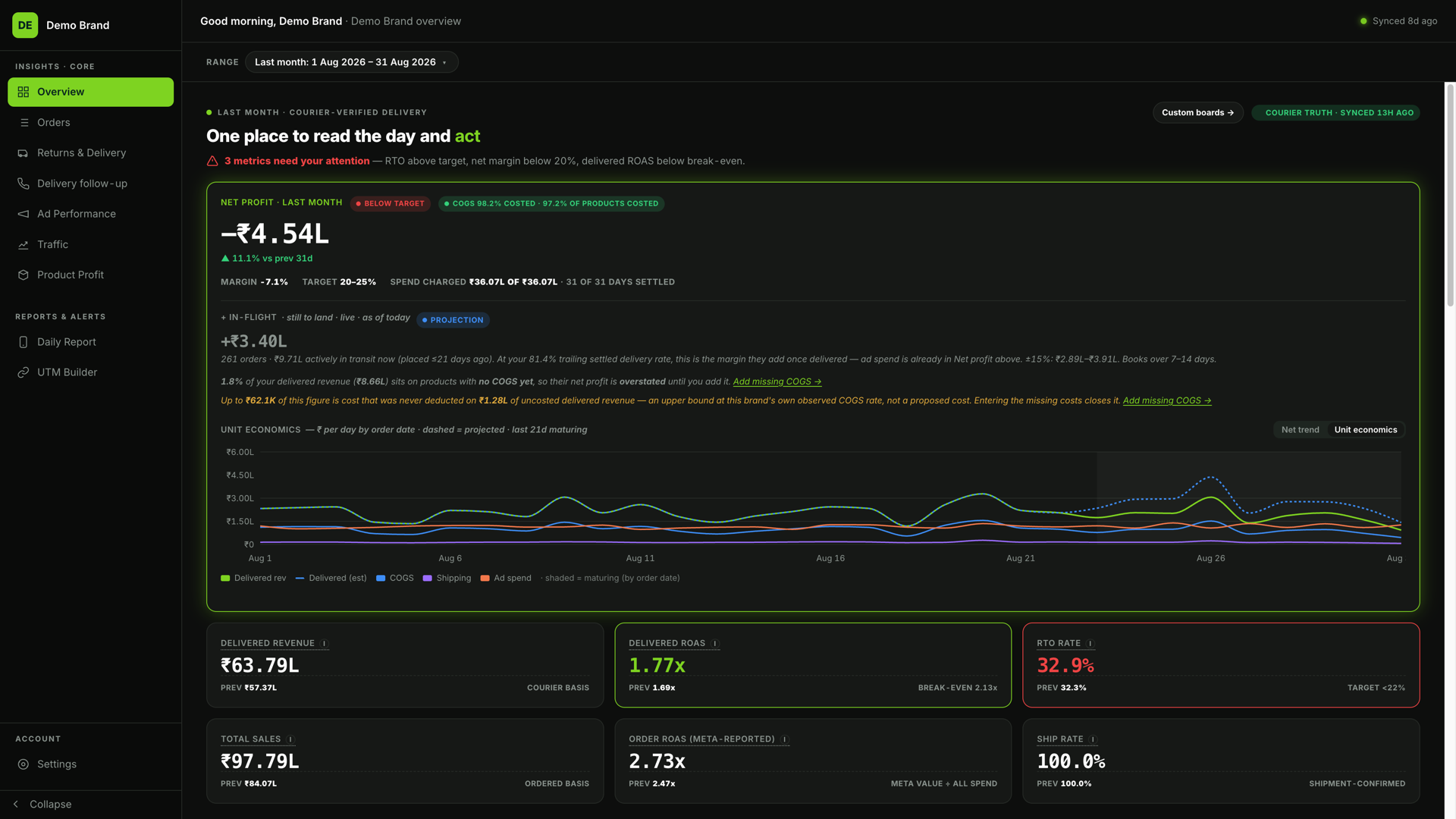
Reports draw on the same connected brand data as Insights. The Overview capture below shows the source workspace—not an example of a WhatsApp message.

Margifi / OverviewDemo Brand
Margifi Overview — actual product with synthetic Demo Brand data
Open full desktop view ↗Real product · Synthetic Demo Brand data

01 / Make it your routine

Start with the reader. Then set the rhythm.

A founder, a marketing lead and a delivery team do not need the same report. Choose from the available report catalogue, add consenting recipients and set the schedule for each report.

  • Daily and role-focused reporting options
  • WhatsApp, email, or both
  • Reports send only after they are enabled
YOUR REPORTING RHYTHM

Your time.
Your numbers.

  1. 01
    Choose the report

    Daily Brief · Marketing · Delivery · Finance

  2. 02
    Choose who receives it

    WhatsApp, email, or both

  3. 03
    Set your send time

    Enable the report when you’re ready

Workflow illustration · not a product screenshot

02 / Keep the detail one click away

Read the summary. Investigate the cause.

Use the dashboard when a number needs context. Review spend and delivery outcomes in Ad Performance, then go deeper into the brand data behind your daily decisions.

  • Check the date window and data coverage
  • Investigate campaign and delivery performance
  • Keep missing data distinct from a zero
Explore Ad Performance
Margifi / Ad PerformanceDemo Brand
Play the walkthroughReal product · Synthetic Demo Brand data

From connected data to a useful next step

Three steps to clearer decisions.

  1. 01

    Connect the required data

    Reports are available according to the data sources your brand has connected.

  2. 02

    Choose who and when

    Add consenting recipients, select the delivery channel and configure the report’s send time.

  3. 03

    Enable and review

    Turn on the report, check delivery status and adjust or pause it when your routine changes.

A few things worth knowing

Straight answers.

Before you connect your brand.

Yes. Choose WhatsApp, email or both when configuring a supported report, and add recipients who have consented to receive it.

Made for Indian Shopify brands

Build a reporting rhythm around your brand.

Share your details, then create your account. We can help you connect your store, ads and courier.

Get started with your brand

7-day free trial. ₹2,999/month after trial, GST included.
AutoPay authorization required during setup.